

Disclosure: This post contains affiliate links. If you sign up through them, I may earn a commission at no extra cost to you. I only recommend tools I actually use.
Most AI tools do one job. Marblism tries to do the job of a whole team. It gives you a set of AI “employees” that handle your inbox, your social media, your lead generation, your SEO content, your phone calls, and even a first pass at contracts, all inside one subscription.
I have been running it across 17 workspaces for my own sites, my clients, and a few personal projects, so this Marblism review comes from real daily use rather than a quick demo.
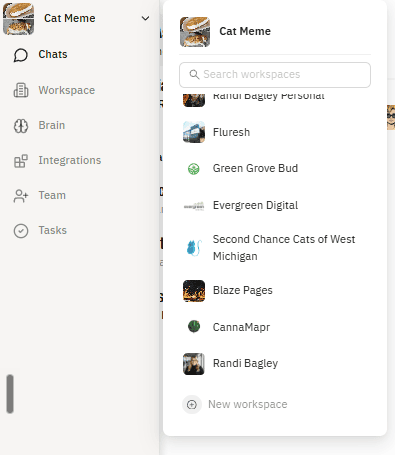
The short version: it is not perfect, and it does the occasional AI-flavored dumb thing, but the value is hard to argue with once you understand how it is priced and what it can and cannot do. Here is the full breakdown.
What Is Marblism?
Marblism is an all-in-one AI platform built around the idea of AI employees. Instead of logging into six different apps, you get six specialized agents working inside a shared workspace. It is a Y Combinator company (W24 batch) and, by its own count, is used by more than 40,000 businesses.
The six AI employees are:

- Executive Assistant (Eva) for your inbox, meeting notes, and reminders
- Social Media Manager (Sonny) for content calendars, posts, and images
- Sales / Lead Gen (Stan) for finding leads and starting email outreach
- SEO Blog Writer (Penny) for keyword research and publishing articles
- Receptionist (Rachel) for a real phone number and call handling
- Legal Assistant (Linda) for basic contract and website legal help
The part that genuinely sets it apart is that these agents talk to each other. In my setup, the assistant reads incoming emails and then tells the social media manager what they say, and he builds posts off of that. That AI-to-AI handoff is the feature I have not seen done this cleanly anywhere else.
Marblism Pricing: What It Actually Costs in 2026
Pricing is refreshingly simple. Every plan includes all six AI employees, unlimited team members, unlimited businesses, 100+ languages, 24/7 support, and the same 50 hours of work per month. The only thing that changes between tiers is the billing cadence.
| Plan | Price | Billing | What’s included |
|---|---|---|---|
| Yearly | $24/mo | Billed annually | All 6 AI employees, 50h/mo, unlimited workspaces |
| Quarterly | $33/mo | Billed every 3 months | Same as above |
| Monthly | $44/mo | Billed monthly | Same as above |
The unlimited businesses line is not marketing fluff. This is the single best thing about the pricing. Each new workspace costs you nothing extra. I have 17 workspaces running and I pay the same as someone with one. Every workspace even gets its own free phone number and 15 free calls for the receptionist, at no added cost. If you manage multiple brands, client accounts, or Facebook pages, that alone can make the math absurd in your favor.
The catch you need to know about: the 50-hour cap.
Every plan includes 50 hours of AI work per month, and that pool is shared across your entire account, not per workspace. Every action an agent takes (drafting an email, posting to social, taking a call) draws down that balance. Hours reset each billing cycle and do not roll over.
When you run out, you buy top-ups. So the “unlimited workspaces” perk is real, but the work those workspaces can do together is capped. Heavy users across many workspaces will hit that ceiling, and I did.
My Experience: Setup and Onboarding

Setup is genuinely easy. Onboarding took about five minutes. It runs a bunch of scans on what you already have and pulls it in for you, so you are not starting from a blank page. Adding a new workspace is just as quick, which is why I ended up with 17 of them without thinking twice about cost.
Connecting your accounts is straightforward. Marblism plugs into Gmail, Google Calendar, and your website platform (WordPress, Wix, Shopify, or Webflow), plus your social profiles.
For social media it covers Facebook, Instagram, X (Twitter), LinkedIn, Google Business Profile, Threads, and Pinterest.
It will also sit in your meetings and take notes!
What Works Well
The AI employees actually collaborate
This is the standout. You can tell one agent to do something and it will loop in another. My assistant pulls the content out of emails and hands it to the social media manager, who turns it into posts. That chain saves me from being the middle man.
It runs on autopilot once configured
After setup, you can hand it a standing instruction (“post twice a week based on this”) and it will just do it on its own. For predictable, low-risk tasks, that hands-off automation is the whole point.
The multi-workspace value is unmatched
Same price, unlimited brands, each with its own phone number. For agencies, freelancers, and anyone juggling several businesses, nothing else on this list prices like that.
What Doesn’t (The Honest Cons)
It is still AI, so it is sometimes just wrong
You get the same quirks you get with any AI. Sometimes it is flat-out incorrect, and sometimes it does not do what you asked. This lines up with what other reviewers report too: posts that miss tags or come back off-brief, and outputs that need a human to catch mistakes.
Overloading a workspace causes “ghost posting”
When I pushed a huge social media workload through one workspace, posting as much as humanly possible, it started ghost posting: publishing things that were not on the schedule. It was clearly me overloading it, but it is worth knowing the automation can get flaky under heavy volume.
Do not fully automate anything sensitive or niche
Because it will occasionally screw up, I would not turn on full autopilot for anything highly specialized or brand-critical. Keep a human in the loop for legal, sales outreach, and anything customer-facing. Treat it as a very capable assistant, not a replacement for judgment.
The 50-hour ceiling
As covered above, unlimited workspaces still share one 50-hour work pool. Plan around it.
Marblism vs Sintra, Fyxer, Motion, Blaze, and Holo
The other tools in this space are mostly point solutions. They do one lane well. Marblism’s pitch is that it covers all the lanes in one place. Here is a fair look at where each one actually plays.
| Feature | Marblism | Sintra | Fyxer | Motion | Blaze | Holo |
|---|---|---|---|---|---|---|
| AI Executive Assistant | Yes | Yes | Email only | Tasks only | No | No |
| Meeting notetaker | Yes | No | Yes | No | No | No |
| Auto-draft inbox replies | Yes | No | Yes | No | No | No |
| All email providers | Yes | Gmail/Outlook | Gmail/Outlook | No | No | No |
| AI Lead Generation | Yes | Partial | No | No | No | No |
| AI Receptionist (phone) | Yes | No | No | No | No | No |
| AI SEO / auto-publish | Yes | Writing only | No | No | Partial | No |
| SEO keywords & audit | Yes | Yes | No | No | Yes | No |
| Social media manager | All platforms | IG, FB, LinkedIn | No | No | Yes | Yes |
| Content calendar & auto-post | Yes | Yes | No | No | Yes | Yes |
| Custom + AI images / carousels | Yes | Yes | No | No | Yes | Yes |
| AI-to-AI collaboration | Yes | No | No | No | No | No |
| Multiple workspaces | Unlimited | Yes | Yes | Yes | Yes | Yes |
| Starting price | $24/mo | ~$39/mo | $30/seat | Tasks/calendar | Social/content | Social/content |
Notes: Sintra is the closest all-in-one rival, but it stays focused on assistant, content, and social work with no phone line or receptionist. Fyxer is an excellent email and meeting assistant and nothing more. Motion is a scheduling and task-planning tool, so it lives in a different category. Blaze and Holo are social media and content generators, strong at posts and creative but not built for inbox, phone, or lead gen. Feature availability and pricing change often, so confirm current specs before you publish.
Who Marblism Is For
This is built for people wearing too many hats. If you run multiple websites, manage clients, and have personal projects going at once, as I do, the unlimited-workspace pricing is close to a cheat code. But you do not need 17 workspaces to justify it. Even a single business gets real value here, and at $44 a month on the monthly plan (or $24 if you commit yearly), one AI employee doing useful work pays for the whole thing.
It is a strong fit for solopreneurs, small business owners, agencies, and freelancers who want broad coverage for one predictable price. It is a weaker fit for large enterprises that need heavy compliance, deep customization, or best-in-class depth in a single function. If you only care about email, a specialist like Fyxer may serve you better. If you want the widest set of AI coworkers for the least money, Marblism wins.
The Verdict
Rating: 4.4 / 5
Marblism delivers more functionality per dollar than anything else I have tested in the AI employee space, and the unlimited-workspace pricing is genuinely rare. It has the normal AI rough edges, occasional wrong outputs, flaky behavior under heavy load, and a 50-hour monthly cap you have to plan around. None of that outweighs what you get. For anyone managing multiple brands or just tired of paying for six separate tools, it is easy to recommend, as long as you keep a human eye on the important stuff.
Marblism holds a 4.8 out of 5 on Trustpilot across nearly 1,000 reviews, which tracks with my own experience. It is not magic, and it will not run your business unsupervised, but as a low-cost AI team that actually works together, it earns its spot.
Marblism Review FAQ
How much does Marblism cost?
Marblism starts at $24 per month billed yearly, $33 per month billed quarterly, or $44 per month billed monthly. Every plan includes all six AI employees, unlimited workspaces, and 50 hours of AI work per month.
What is the 50-hour limit?
Each plan includes 50 hours of AI work per month, shared across your whole account. Every action an agent takes uses part of that balance. Hours reset each cycle and do not roll over, and you can buy top-ups if you run out.
Can I add multiple businesses on one plan?
Yes. Workspaces are unlimited at no extra cost, and each one gets its own free phone number and 15 free calls for the receptionist. This is the platform’s biggest advantage for agencies and multi-brand owners.
Is Marblism worth it?
For most solopreneurs, small businesses, and agencies, yes. The breadth of features for the price is excellent. Just keep a human reviewing anything legal, sales, or brand-critical, since the AI occasionally makes mistakes.
How does Marblism compare to Sintra?
Sintra is the closest all-in-one competitor and does assistant, content, and social work well, but it lacks a phone receptionist, lead-gen outreach, and the AI-to-AI collaboration Marblism offers. Marblism also starts at a lower price.